
Home » About » Premium Musician Page Tips
Premium Musician Page Tips
Whether you use a standard musician page or have upgraded to Premium, keeping your page current and complete helps you make the most of your presence on All About Jazz. If you're upgrading, the information already on your standard page provides the foundation for the striking presentation and expanded features of your Premium Musician Page.
Before Upgrading to Premium
Start with a current and complete standard musician page. Before placing your order:
- Upload a current thumbnail image.
- Add large, high-resolution photos to your gallery. We'll select one for your cover photo.
- Add up to ten tags and ten influences.
- Make sure your biography is current.
- Review your website, social, streaming and other links.
- Add up to six videos.
- Make sure your discography is complete.
- Review every section in your musician page update form for missing or outdated information.
Once your standard page is current and complete, you're ready to upgrade.
Prior to purchasing the Premium Musician Page service, prepare your page...
To ensure minimal delays in upgrading your musician page, please address the following: upload a thumbnail image; upload large / hi-res photos to your gallery (we will select one as your cover photo); add up to ten tags and up to ten influencers; make sure your biography is current and make sure all links are accounted for; add up to six videos and make sure your discography is complete. You're essentially completing the standard information, so be sure scroll down the bottom of the page. Once your standard page is current and complete, you are ready to upgrade! For additional tips, go here.
Make the Most of Your Premium Musician Page
Premium transforms your standard musician page into a more striking, ad-free professional presence, with expanded options for presenting your music, videos, events, links and other information.
Once your page has been upgraded, use the additional Premium features below to make your presence as complete, useful and current as possible.
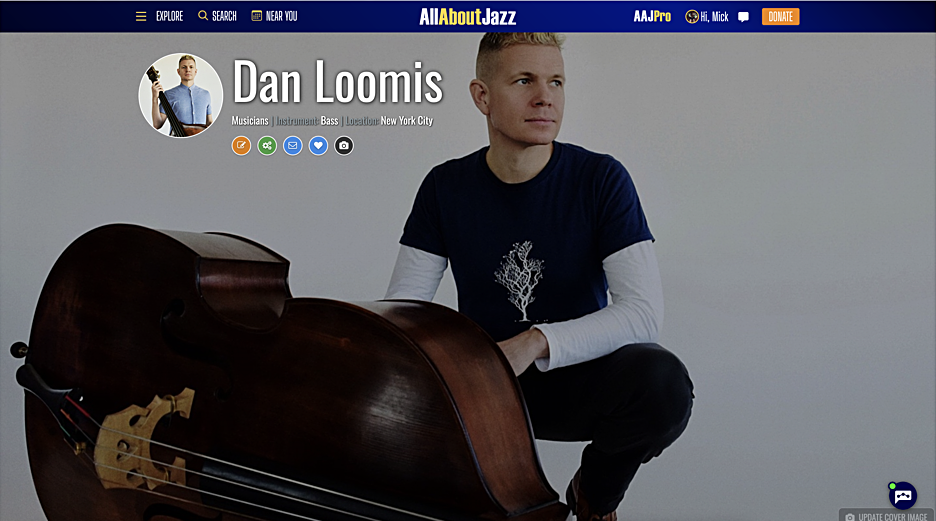
From your musician page update form...
- Each premium page supports a cover photo. Make sure it's sized to 1600x800 pixels.
- If possible, choose a cover image where you are positioned on the right and facing left.
- Enter your Management/Booking information under the "Contacts" section.
- Add a featured press quote.
- Upload more photos to include in your slideshow.
- Add your Bandcamp, Apple Music, Tidal, Amazon Music, Qobuz, Bandsintown and Spotify links. If you are a Bandsintown user, All About Jazz will automatically import your events from Bandsintown. It's quite the timesaver!
- A dedicated video page comes with the premium service, so take advantage of it. Add up to 12 videos.
- Embed your Soundcloud Player, Spotify and your Bandcamp Players.
- Add your missing albums to your discography section and override the default Amazon button with a link to a page location of your choice (e.g. Apple Music, Bandcamp, your website, etc.).
- Add links to external articles (about you) under the "More Premium Options" section
Follow these steps and your Premium Musician Page will present a more complete, current and professional picture of who you are, what you're doing and where listeners can discover more
Have a New Release?
- Upload a track from your album for Song of the Day consideration, here (learn more)
- Consider a Take Five Q&A article ($60; learn more)


